Why We Built an AI Prompt Token Counter (And How Tokenization Actually Works) | TiltStack

Why We Built an AI Prompt Token Counter (And How Tokenization Actually Works)
The incident that triggered this build was embarrassingly predictable in hindsight.
We were running a multi-turn analysis pipeline for a client — iteratively feeding large
document chunks into GPT-4 alongside accumulated conversation history. The pipeline
worked perfectly in testing on small documents. In production, on a 90-page legal brief,
it silently corrupted halfway through: the model started contradicting itself,
hallucinating clause references that didn't exist in the source document, and producing
structurally incoherent summaries.
The diagnostic took longer than it should have. We'd burned the context window. The
conversation history plus the document chunk exceeded GPT-4's limit, so the API
silently truncated the oldest messages. The model was responding to a partial view of
the conversation — confidently, without any indication that it was working with
incomplete context.
We'd eyeballed the prompt length. We hadn't counted the tokens.
That was the day we stopped eyeballing and started building. The result is the
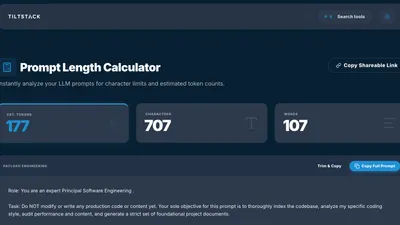
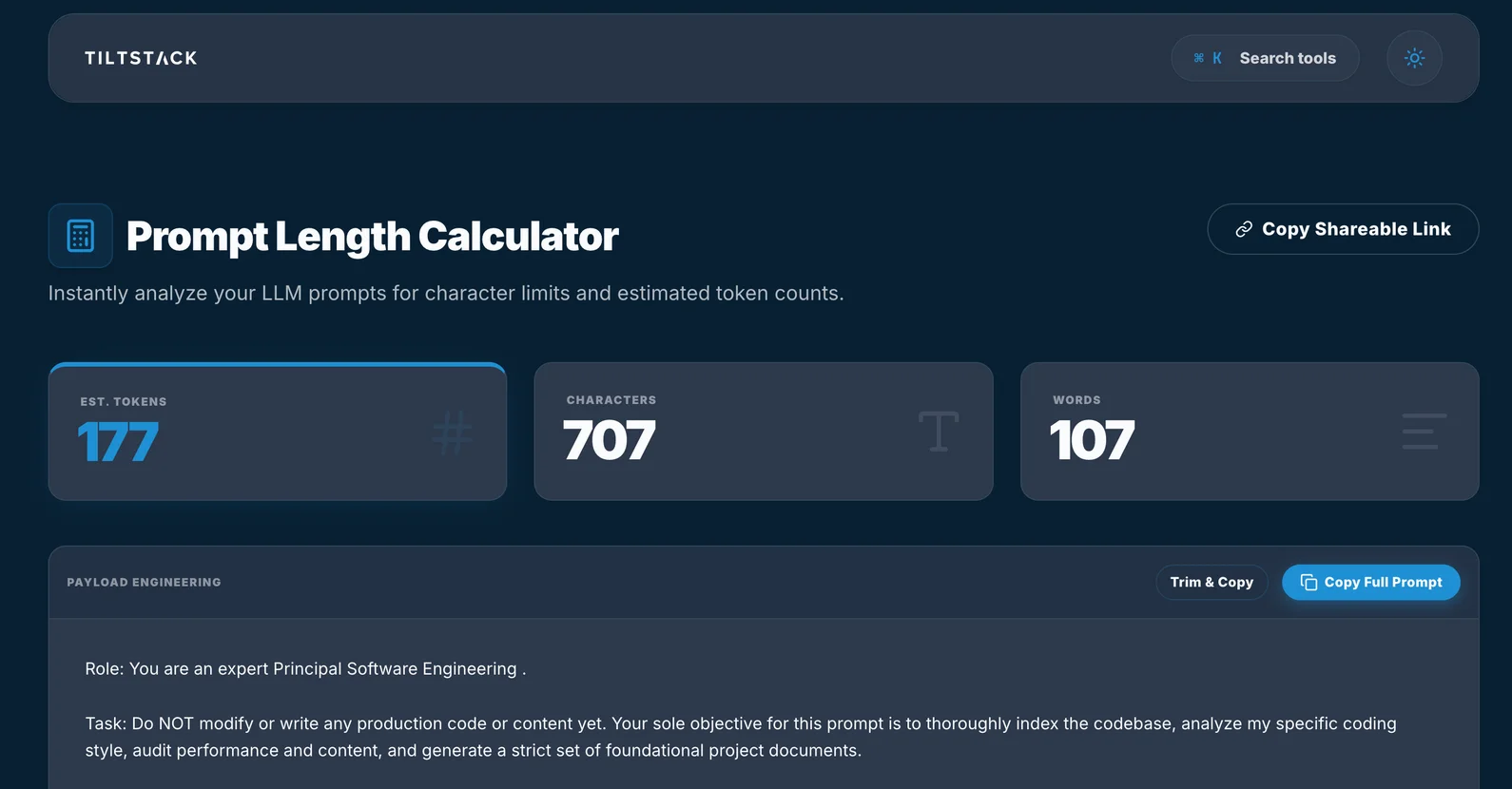
TiltStack Prompt Length Calculator —
a client-side tool that counts tokens accurately per model, shows you a live breakdown
of characters and words, and never sends your prompt text anywhere.
Why Word Count Doesn't Work
The first instinct is to approximate tokens by word count. Everyone says "roughly 1 token
per word" or "about 4 characters per token." Both of these are directionally true for
fluent English prose — and both break down in exactly the cases where you most need
precision.
Code is denser than English. Python, JavaScript, and JSON have high information
density per character. config["database"]["connection_string"] doesn't tokenize the
way its word count suggests. Symbol-heavy production code can run 1.5–2× the tokens
you'd expect from a raw character or word count estimate.
Rare words, technical jargon, and proper nouns are often multi-token. The word
"psychoneuroimmunology" is 7 tokens in cl100k_base. "Kubernetes" is 3.
"useState" splits differently than "use state." Your model tokenizes against a fixed
vocabulary — anything not in it gets split into subword units, each costing a token.
Non-English text is significantly more expensive. Korean, Arabic, and Chinese
characters that represent single concepts often tokenize as 2–4 tokens each in English-
biased vocabularies. A 500-word prompt in Korean can cost 2–3× as many tokens as the
same semantic content in English. This matters whenever you're building multilingual
applications or processing international documents.
Whitespace, punctuation, and structure count. A system prompt with careful
formatting — headers, numbered lists, code blocks, delimiter strings — pays a formatting
tax. A bare-prose system prompt conveying the same instructions will tokenize smaller.
Neither is wrong, but the difference is measurable when you're near a context limit.
None of this is obvious from a word count. All of it surfaces immediately from a token count.
What Tokenization Actually Is
GPT-family models use Byte Pair Encoding (BPE), a subword tokenization algorithm
originally developed for lossless data compression, adapted for neural machine translation
by Sennrich et al. in 2016, and now the backbone of every major language model tokenizer.
The intuition: start with a vocabulary of individual bytes (the 256 values 0x00–0xFF).
Iteratively find the most frequent pair of adjacent symbols in your training corpus and
merge them into a single new symbol. Repeat until you hit your target vocabulary size —
100,277 tokens for cl100k_base (GPT-3.5, GPT-4), approximately 200,000 foro200k_base (GPT-4o, GPT-4o-mini, o1, o3).
The result: common words become single tokens. Rare words decompose into sequences of
shorter subword tokens. The model never encounters an "unknown" — any string of bytes
produces a valid tokenization, even if it's an inefficient one.
This is why you can't accurately replay tokenization without the specific merge table
for the specific model you're targeting.
The Encoding Divergence Problem
GPT-4 (cl100k_base) and GPT-4o (o200k_base) tokenize the same input differently.
The same 500-word prompt might be 420 tokens on one and 397 on the other. Not a huge
delta until you're running a production pipeline at the edge of a 128K context window and
optimizing every call.
A reference for the current OpenAI model lineup:
| Model | Encoding | Context Window | Input Cost |
|---|---|---|---|
| GPT-4o | o200k_base | 128,000 tokens | $2.50 / 1M |
| GPT-4o-mini | o200k_base | 128,000 tokens | $0.15 / 1M |
| GPT-4 Turbo | cl100k_base | 128,000 tokens | $10.00 / 1M |
| GPT-3.5 Turbo | cl100k_base | 16,385 tokens | $0.50 / 1M |
| o1 | o200k_base | 200,000 tokens | $15.00 / 1M |
| o3-mini | o200k_base | 200,000 tokens | $1.10 / 1M |
(Verify against the OpenAI pricing page — rates change.)
A tool that only approximates tokens and doesn't distinguish by target model is giving
you a number that could be wrong in either direction at the margins you actually care about.
The Context Window Math That Actually Bites You
The context window limit applies to the total of every token in your request:
system prompt + conversation history + current user message + retrieved context (RAG
chunks) + tool/function definitions + headroom you need to reserve for the output.
The calculation you actually need:
tokens_available_for_content =
    context_limit
    - system_prompt_tokens
    - conversation_history_tokens
    - tool_definition_tokens
    - max_completion_tokens_reserved
A concrete GPT-4o call with a moderately complex setup:
| Component | Tokens |
|---|---|
| System prompt (persona + instructions) | ~500 |
| 3-turn conversation history | ~2,000 |
| RAG document chunk | ~5,000 |
| 4 function definitions | ~600 |
| Reserved for completion | ~2,000 |
| Total consumed before user types | ~10,100 |
That's 10,100 tokens used before the user types a single word. Fine against a 128K
limit in isolation — until you're 20 turns into a long session, the history has
accumulated, and the document context keeps growing. The pipelines that burn context
windows fastest are exactly the ones where you're simultaneously growing the most
history.
The Silent Truncation Problem
When you exceed the context limit, the OpenAI chat completions API doesn't return an
error by default. It silently truncates. Which messages get truncated — and in what
order — depends on the API endpoint and version, but the general behavior for chat
completions is: oldest messages drop first.
This means your carefully tuned system prompt survives. The context the model actually
needs to answer correctly — document chunks you retrieved, conversation history that
established key constraints — gets silently amputated.
The model doesn't know what it's missing. It answers confidently from incomplete
context. This looks like hallucination. It's not — it's a truncation artifact,
and it's entirely preventable if you're counting tokens before you send.
Why We Built It Client-Side
The architectural decision for the Prompt Length Calculator
was straightforward: your prompts are none of our business.
When you're prompt-engineering a production pipeline, the text you're working with is
often the most sensitive content in your stack. Proprietary system prompts encode your
product's business logic. Document context contains client data. A token counter that
routes your prompt through a server to count it is a privacy liability before it's a
feature.
The calculator runs entirely in the browser. The tiktoken WASM binary loads once on
first use and gets cached by the browser. Every subsequent tokenization call:
- Receives the input string in the JavaScript main thread
- Passes it to the WASM module via a typed array buffer
- Gets back token count, character count, and word count synchronously
- Renders the three metric cards you see in the UI: EST. TOKENS / CHARACTERS / WORDS
Zero network requests after the initial asset load. Zero server logs of your prompt
text. Zero latency beyond the WASM call itself, which runs in microseconds for any
realistic prompt length.
The Payload Engineering Panel
The "PAYLOAD ENGINEERING" section below the metric cards is where the tool goes beyond
a simple counter. It lets you structure a multi-part prompt — system message, user
turns, assistant turns — and see the token breakdown per segment, not just for the
whole string.
This is the view you actually need when debugging context consumption. Knowing the
aggregate is useful. Knowing that your system prompt is 1,400 tokens, your few-shot
examples are 3,200 tokens, and the human's most recent message is 45 tokens — that
tells you where to optimize.
The "Trim & Copy" action removes leading/trailing whitespace and redundant newlines
before copying to clipboard. In our experience, system prompts accumulate surprising
amounts of invisible whitespace during iterative editing. A single cleanup pass
routinely saves 30–80 tokens on prompts that have been heavily revised.
Handling Large Inputs Without Blocking the UI
Tokenizing a 50KB string synchronously on the main thread blocks rendering for a
perceptible moment on lower-end hardware. For inputs above a configurable character
threshold, the tokenization is offloaded to a Web Worker —
a background thread that can run computation without touching the UI.
The Worker posts the result back to the main thread via postMessage. The metric cards
update when the count arrives. For typical prompt lengths (under 8,000 characters),
the round-trip to the Worker is imperceptible. For large document dumps, it prevents
the UI from freezing while you wait.
Practical Token Management Patterns
After running token-counted pipelines in production for several months, a few habits
have compounded into significant cost and reliability improvements:
Count your system prompt once, document it, treat it as a fixed budget. A system
prompt rarely changes between calls. Calculate its token cost once, note it in your
codebase, and subtract it from your effective context headroom for every other component.
Surprises come from the components that grow dynamically — history, RAG context — not
from the static system prompt.
Gate every API call with an explicit token check. Before the API call fires, count
the total tokens. If total_tokens > context_limit * 0.90, handle it explicitly in your
code: summarize history, truncate the oldest RAG chunk, or split into multiple calls.
Don't let the API decide how to handle the overflow.
// Pseudocode — explicit token gate before API call
const totalTokens = countTokens([systemPrompt, ...history, userMessage]);
const CONTEXT_LIMIT = 128_000;
const COMPLETION_RESERVE = 2_000;

if (totalTokens > CONTEXT_LIMIT - COMPLETION_RESERVE) {
    history = await summarizeOldestTurns(history);
    // or: ragChunks = trimToFit(ragChunks, CONTEXT_LIMIT - totalTokens);
}

const response = await openai.chat.completions.create({ /* ... */ });
Chunk documents by tokens, not characters. Most document chunking implementations
split on character count or sentence boundaries. A 500-character chunk of dense JSON
might be 160 tokens; a 500-character chunk of English prose might be 115. If you're
designing a RAG pipeline and optimizing for context window efficiency, measure chunk size
in tokens at the chunking step — not as a post-hoc validation.
Track usage in every production API response. The OpenAI API returnsusage.prompt_tokens and usage.completion_tokens in every chat completions response.
Log these. Aggregate over a week. The distribution tells you exactly where your token
spend is going and which prompt components are the most expensive. Most AI cost
problems we've diagnosed for clients started with someone realizing they'd never actually
looked at this field.
// OpenAI response — always present, often ignored
{
  "usage": {
    "prompt_tokens": 4892,
    "completion_tokens": 437,
    "total_tokens": 5329
  }
}
Try It Now — No Account Required
→ Open the Prompt Length Calculator
Paste your system prompt, conversation history, RAG document chunks — whatever you're
debugging. The tool gives you:
- Estimated token count (BPE-approximated, updated live as you type)
- Character and word counts alongside the token count
- Per-segment breakdown in the Payload Engineering panel
- Trim & Copy to clean whitespace before sending
- Shareable link to send a specific prompt configuration to a teammate
No login. No account. Nothing leaves your browser. It's part of the
TiltStack DevSuite — a growing set of browser-native developer tools we built
for our own workflows and open-sourced for the community.
Where a Token Counter Ends and Engineering Begins
Knowing how many tokens your prompt uses is the prerequisite. The harder engineering work
is designing pipelines that are robust against context limits:
- Dynamic context compression — summarizing history rather than truncating it
- Adaptive RAG chunk sizing — fitting more context into the available window without
degrading retrieval quality - Model routing — using GPT-4o-mini for classification and triage before escalating to
GPT-4o or o1 for reasoning tasks that need it, cutting cost by 10–20× on high-volume
paths - Semantic caching — identifying near-identical prompt patterns and serving cached
responses instead of burning tokens on an API call - HIPAA/SOC2-compliant AI pipeline design — ensuring regulated data never enters a
context window it shouldn't
These are architecture decisions, not tool features.
If you're running into context management problems at scale, or you're early in building
an AI-integrated product and want the architecture to be right from the start, that's
the kind of engagement the TiltStack AI consulting team is built for. We've
shipped production AI pipelines for clients in legal, healthcare, and B2B SaaS — and
the token budget conversation is one of the first things we map in any new project.
The Prompt Length Calculator is the diagnostic.
The engineering is the solution.
FAQs
Q1: Why does the token count differ between GPT-4 and GPT-4o for the same prompt?
A: They use different tokenization encodings — cl100k_base for GPT-4 and GPT-3.5, ando200k_base for GPT-4o, GPT-4o-mini, and the o1/o3 series. o200k_base has a larger
vocabulary (~200K merge rules vs. ~100K), so it encodes many common sequences into fewer
tokens. The same 500-word English prompt might be 5–10% more token-efficient on GPT-4o.
For code-heavy prompts, the delta can be larger. Always count against the specific model
you're targeting.
Q2: Does the tool work for Anthropic Claude or Google Gemini token counting?
A: Not yet — both use proprietary tokenizers that aren't publicly available in the same
way OpenAI's tiktoken is. For Claude, the Anthropic API returns token counts in its
response headers — you can measure after the fact. For Gemini, Google AI Studio exposes
a countTokens API endpoint. As rough estimates: Claude's tokenizer is similar in
efficiency to o200k_base for English. Gemini's varies more by content type and language.
Q3: How accurate is "roughly 1 token per word" in practice?
A: For standard English prose, it's 1.1–1.35 tokens per word. For code, expect 1.5–2.5
tokens per "word equivalent" depending on language and symbol density. For structured
data (JSON, YAML), it varies dramatically based on key verbosity and nesting depth. The
heuristic is fine for order-of-magnitude estimates; it's insufficient for production
pipeline design where you're working within a few thousand tokens of the context limit.
Q4: Does my prompt get sent to any server when I use the tool?
A: No. Tokenization runs fully inside your browser via a WebAssembly module. After the
WASM binary loads on first visit (and gets cached), no network requests are made during
tokenization. You can verify this yourself: open Chrome DevTools → Network tab, then
type or paste a prompt. You'll see zero new requests fire. Your text stays on your
machine.
Q5: We're building an AI application at scale and the token cost is becoming
significant. Can TiltStack help architect a more efficient pipeline?
A: Yes. Cost optimization for production AI pipelines — model routing, semantic caching,
context compression, adaptive chunking — is standard work in our AI integration
engagements. The problems look different depending on whether you're running
a document analysis pipeline, a multi-agent system, or a high-volume customer support
workflow. Start with a conversation and we'll map the specific opportunity for your stack.