The Small Business SEO Guide That Actually Works in 2025

The Small Business SEO Guide That Actually Works in 2025
Most SEO guides for small businesses tell you to "do keyword research" and "create quality content." That's accurate but not useful, it's the equivalent of a cooking guide that tells you to "combine ingredients and apply heat."
This guide is different. It's our actual working checklist, the specific technical and content steps we execute on every custom site we build before we consider it launch-ready from an SEO standpoint. If you run through this list, you'll have covered more ground than most local competitor sites ever will.
Before Anything Else: Set Up Your Measurement Stack
You can't improve what you can't see. The first step on every project is measurement infrastructure.
Google Search Console (free, mandatory):
Verify your site via DNS record or HTML tag. This is how Google tells you which queries are surfacing your site, which pages are indexed, any coverage errors, and your Core Web Vitals status. If your site isn't in Search Console, you're flying blind.
Google Analytics 4 (free, mandatory):
Set up GA4 and configure at least one conversion event, typically a form submission or contact page visit. Knowing traffic volume without knowing conversion behavior is only half the picture.
Set a baseline before you change anything. Screenshot your current Search Console data. You need a before/after comparison to know if your changes are working.
Step 1: Technical Foundation, The Unglamorous Part That Matters Most
Technical issues are silent ranking killers. Before writing a single piece of content, fix these:
HTTPS everywhere. Google flags HTTP sites as insecure in the browser and they rank lower. Every page must redirect HTTP → HTTPS. Check for mixed content (HTTP images or scripts on an HTTPS page) with a browser devtools audit.
One canonical URL per page. Does example.com and www.example.com serve the same content? Both should exist but one must be set as canonical and the other should 301 redirect. Same for trailing slash: /about and /about/ shouldn't both serve content. Pick one, redirect the other.
robots.txt configured correctly. A misconfigured robots.txt that blocks Googlebot is one of the most common and damaging technical SEO errors. Verify yours at yourdomain.com/robots.txt. Make sure your public pages are Allow: /.
XML sitemap submitted. Generate a sitemap that lists every important page, and submit it in Google Search Console under Sitemaps. This helps Google discover your pages, especially on newer sites with few inbound links.
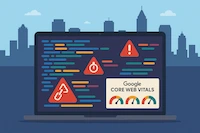
Core Web Vitals passing. Run your site through PageSpeed Insights on mobile. You need:
- LCP (Largest Contentful Paint) under 2.5s
- CLS (Cumulative Layout Shift) under 0.1
- INP (Interaction to Next Paint) under 200ms
If you fail these, your content quality doesn't matter, you're already at a disadvantage versus competitors who pass.
Step 2: On-Page Structure, What Google Actually Reads First
One <h1> per page, containing your primary keyword. This is the most important heading on the page. It should clearly state what the page is about. Example: <h1>Custom Web Design Services for Atlanta Small Businesses</h1> beats <h1>Welcome to Our Site</h1> in every meaningful way.
<title> tag and meta description. Every page needs a unique title (under 60 characters) and a meta description (140–160 characters). These appear in search results. Write them for humans, not just keyword density.
- Title format:
[Primary Keyword], [City/Differentiator] | TiltStack - Meta description: What you do + who you serve + what makes you different. Include your city/location for local search.
Heading hierarchy matters. <h2> for main sections, <h3> for subsections. Don't use headings for design purposes, use them to outline the document structure. Google and screen readers both use the heading structure to understand your content.
Alt text on every image. Not keyword stuffed, descriptively accurate. An image of your team in your Atlanta office should have alt="TiltStack web development team in Atlanta office" not alt="" or alt="image".
Step 3: Keyword Strategy, Think Intent, Not Volume
The biggest mistake small businesses make with keywords is chasing terms that are too broad. "Web design" has enormous search volume, and Google shows the top 10 national players for it. You're not competing there yet.
Instead, target intent-specific and location-specific searches:
- "web design agency Atlanta" (location-specific)
- "how much does a custom website cost" (intent: price research)
- "Wix vs custom website for small business" (intent: decision research)
- "Eleventy developer hire" (intent: high purchase intent, low competition)
How to find these terms:
- Google Keyword Planner, filter for monthly searches 100–1,000, low competition
- Google's "People also ask" boxes and autocomplete suggestions
- Your own Search Console data, what are you already ranking page 2-4 for? Those are your quick-win targets.
One primary keyword per page. Don't try to rank for 10 terms on one page. Target one, use related terms naturally in subheadings and body. Google understands semantic relationships now, you don't need to repeat your keyword every other sentence.
Step 4: Local SEO, If You Serve a Geographic Area
If your business serves customers in a specific city or region, local SEO is your highest-leverage channel.
Google Business Profile (mandatory for local businesses):
Claim and verify your Google Business Profile at business.google.com. Complete every field: business category, hours, address, phone, website, photos. This is what powers the "local pack", the map results that show 3 businesses above organic search results for local queries.
NAP consistency (Name, Address, Phone):
Your business name, address, and phone number must be identical everywhere they appear online, your website, your Google Business Profile, Yelp, your Google Maps listing. Inconsistencies confuse Google and hurt local ranking.
LocalBusiness JSON-LD schema:
This is structured data markup that explicitly tells Google your name, address, phone, hours, and service area. We auto-inject this on every local business site we build. Here's what a basic implementation looks like:
{
  "@context": "https://schema.org",
  "@type": "LocalBusiness",
  "name": "TiltStack",
  "address": {
    "@type": "PostalAddress",
    "streetAddress": "Your Street",
    "addressLocality": "Atlanta",
    "addressRegion": "GA",
    "postalCode": "30301",
    "addressCountry": "US"
  },
  "telephone": "+1-XXX-XXX-XXXX",
  "url": "https://www.tiltstack.com"
}
Get reviews consistently:
Google Business Profile reviews are a direct local ranking factor. Build a system for requesting reviews after every successful project or service. An automated follow-up email with a direct review link removes friction significantly.
Step 5: Content, Write for Answers, Not for Volume
The content landscape has shifted. AI-generated content is everywhere; generic listicles are cheap to produce and cheap to ignore. What ranks in 2025 is content with demonstrable first-hand experience and specific, useful answers.
Write about what you've actually done. A post that says "here's how we migrated a Framer site to Eleventy and what the Lighthouse delta looked like" will outperform a post that says "reasons why custom websites are better than builders." Experience signals matter.
Structure content for direct answers. Use explicit question headings (## How much does a custom website cost for a small business?). The answer to that question should be in the first two sentences below the heading, not buried in the third paragraph. This structure is what both Google's featured snippets and LLMs pull from for answers.
Use the FAQ pattern at the bottom of every post. Our post.html layout automatically generates FAQPage JSON-LD schema from questions formatted as **Q1: ...** / A: .... This gives your FAQ section a chance to appear in Google's FAQ rich results, which significantly increases click-through rate.
Internal linking: Every post should link to at least 2 other pages on your site (services, related posts). This distributes PageRank and helps Google understand your site's topic structure.
What "Working" Looks Like (Timeline)
Set realistic expectations. SEO compounds over time:
- Weeks 1–4: Google indexes your new/updated pages. Technical fixes start to resolve errors in Search Console.
- Months 1–3: You start seeing impressions grow for your target keywords. Rankings may still be low (page 2–4).
- Months 3–6: With consistent content and a clean technical foundation, you start seeing meaningful organic traffic from mid-tail keywords.
- Months 6–12+: Established authority in your topic area, consistent lead flow from organic search.
If someone promises you page-1 rankings in 30 days, walk away. That's not how search engines work.
FAQs
Q1: How long does it take small business SEO to show results?
A: Technical fixes (indexing errors, speed improvements) can surface improvements in 2–4 weeks. Content-driven ranking increases typically take 3–6 months of consistent publishing and internal linking. Local SEO through Google Business Profile can move faster, 4–8 weeks for profile optimizations to affect local pack visibility.
Q2: Do I need to hire an SEO agency or can I do this myself?
A: The technical foundation (HTTPS, canonical URLs, Core Web Vitals, schema markup) is genuinely difficult to do correctly without development expertise. The content and local SEO pieces are more accessible for business owners. Our recommendation is to invest in getting the technical foundation right professionally, then develop a content rhythm you can maintain yourself.
Q3: What's the most common SEO mistake you see in small business sites?
A: By far, the most common is sites that look great but score 40–55 on PageSpeed Insights mobile. Poor Core Web Vitals is an active ranking suppressor that no amount of good content can fully overcome. Fix the technical foundation before investing heavily in content.
Q4: Is blogging still worth it for small business SEO?
A: Yes, but the bar has risen. Generic informational content faces intense competition from AI-generated articles and large established sites. The posts that work in 2025 are specific, experience-backed, and answer questions your actual customers ask. One high-quality post per month beats four generic ones every time.
Q5: How do I know if my current website has technical SEO problems?
A: Run your homepage through PageSpeed Insights and check Google Search Console for coverage errors. We also offer a standalone SEO audit ($295) that gives you a prioritized action plan specific to your site.